
Nagoya Map0.6.8 - Get APK
You'll be able to download in few seconds.
Publisher Description
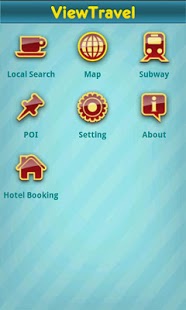
Nagoya Map is useful and powerful app that can help you to search place in map, guide you to destination, obtain daily-life information around you and book worthwhile hotel online. This app is especially for users who travel or live in Nagoya.
Key features:
√ Online and offline map supported by OpenStreetMap.
√ Obtain and mark your current position in map.
√ Nagoya subway map.
√ Professional level navigation with routing offline from point to point supported by Osmand.
√ Booking hotel online, help you to search worthwhile hotel in Nagoya from different sources, compare their prices in one page, and tap your selected one to book it online.
√ Local search in Nagoya powered by viewtravel (www.viewtravel.com).It includes restaurant, hotel, attraction, nightlife, shopping, tour, etc which location can be shown in map.
√ POI in Nagoya, support searching POI around you.
√ Indicate your direction.
√ GPS real-time tracking with built-in compass
√ Search point by name, type, distance or type+name, type+distance
√ Voice guidance
User Guide:
★Local Search:
Tap "Local Search" to enter it. This channel provide the information of restaurant, hotel, attraction, nightlife, shopping, tour, etc around your current location. You can filter the result by distance, relevance, ratings. Tap the item on result list, then tap "map" to see its location in map view. You can use navigation function to guide you to there.
★Hotel Booking:
Tap "Hotel Booking" to enter hotel booking channel, here you can obtain lowest price of specified hotel. Hotel from different sources will be listed, you can compare their price in one page. Booking the hotel just by tapping the button aligned after your desired source
★Map:
Online map need network connection, but without any additional settings. You can tap "Map" to enter map view to use it immediately.
Offline map need no network connection. Before first using offline map, some settings should be specified.
1.Download map data first. Tap the "Map" to enter map view, then go to menu->Settings->Offline data, tap the "Download" button, then enable each item in the list checked, tap "Download" again to download map data.
2.After the map data has been downloaded, go to menu->Settings->Maps, tap the "Offline vector maps" to enable it checked.
3.Now,offline map can be used normally.
★Navigation
Make sure your GPS Status is on which your location can be obtained by GPS and shown in map.
1.Drag the map to your desired location, long press and hold your finger on the map a few seconds to set start point or target point, then tap on the point to pop up context menu to perform following actions: navigate to point, route from, search POI, Search transport, add to favorites, share location, create POI, etc. Routes will be shown in map with colored line.
2.You can specify location by many ways, such as address, latitude, longitude, etc. Go to menu->Specify point to specify location.
3.More navigation settings refers to menu->Settings->Navigation.
Wish you a good trip!
About Nagoya Map
The company that develops Nagoya Map is Liu Zhihong. The latest version released by its developer is 0.6.8.
To install Nagoya Map on your Android device, just click the green Continue To App button above to start the installation process. The app is listed on our website since 2012-01-18 and was downloaded 0 times. We have already checked if the download link is safe, however for your own protection we recommend that you scan the downloaded app with your antivirus. Your antivirus may detect the Nagoya Map as malware as malware if the download link to com.nagoya.mobson.view is broken.
How to install Nagoya Map on your Android device:
- Click on the Continue To App button on our website. This will redirect you to Google Play.
- Once the Nagoya Map is shown in the Google Play listing of your Android device, you can start its download and installation. Tap on the Install button located below the search bar and to the right of the app icon.
- A pop-up window with the permissions required by Nagoya Map will be shown. Click on Accept to continue the process.
- Nagoya Map will be downloaded onto your device, displaying a progress. Once the download completes, the installation will start and you'll get a notification after the installation is finished.
Program Details
System requirements
Download information
Pricing
Version History
version 0.6.8
posted on 2012-01-18
Several fixes and updates
version 0.6.8
posted on 2012-01-18
Disclaimer
External Download
We do not host Nagoya Map on our servers. We did not scan it for viruses, adware, spyware or other type of malware. This app is hosted by Galad and passed their terms and conditions to be listed there. We recommend caution when installing it.
The APK Download link for Nagoya Map is provided to you by apps112.com without any warranties, representations or guarantees of any kind, so access it at your own risk.
If you have questions regarding this particular app contact the publisher directly. For questions about the functionalities of apps112.com contact us.
